AI-Native Product Workflow
How I run product work with AI agents, mainly Claude and Grok. I design, one model builds, a different model tries to break it, and a human holds every gate. The build loop runs on Musterhall. The standard for done and the human gates also run on a client engagement.
- Role
- Product & Design Lead
- Timeline
- 2025 – Present
- Platform
- Process · Musterhall and a client brand
- Tools
- Claude Code, Claude Cowork, Grok Bot, Figma, ClickUp, Slack, GitHub
At a glance
- The problem
- AI agents work fast, and they will also tell you something is done when it isn’t. A model that reviews its own work shares its own blind spots. I needed the speed without lowering the bar for what counts as finished.
- What I did
- I lead product and design. I design the screens, and agents build the mockups and code from my direction. On Musterhall I run the full agent workflow: a fixed loop for every change, a builder and a reviewer on different models, the right model for each task, and rules enforced in code. On both products, the same standard for done and the same human gates apply.
- Key decision
- The model that builds never reviews its own work. Claude builds. Grok, a different model family, reviews with read-only access and tries to break it. On early tickets, reviewers on other models caught serious bugs the builder had shipped. That is why the rule exists.
Overview
This case study is about a way of working, not a single screen. I run product work with AI agents, mainly Claude and Grok. I design the screens and set the direction. Agents build the mockups and code, check them and critique them. I decide what ships, how it looks, and when it is done.

Musterhall
A part-time, pre-launch side venture: a trends and knowledge learning platform. I’m a co-founder and I lead product and UX/UI. The full build loop runs here.
A pre-launch client engagement. I’m the design lead: brand identity, packaging, Amazon assets and the waitlist website. The same standard for done and the same human gates apply here.
The loop
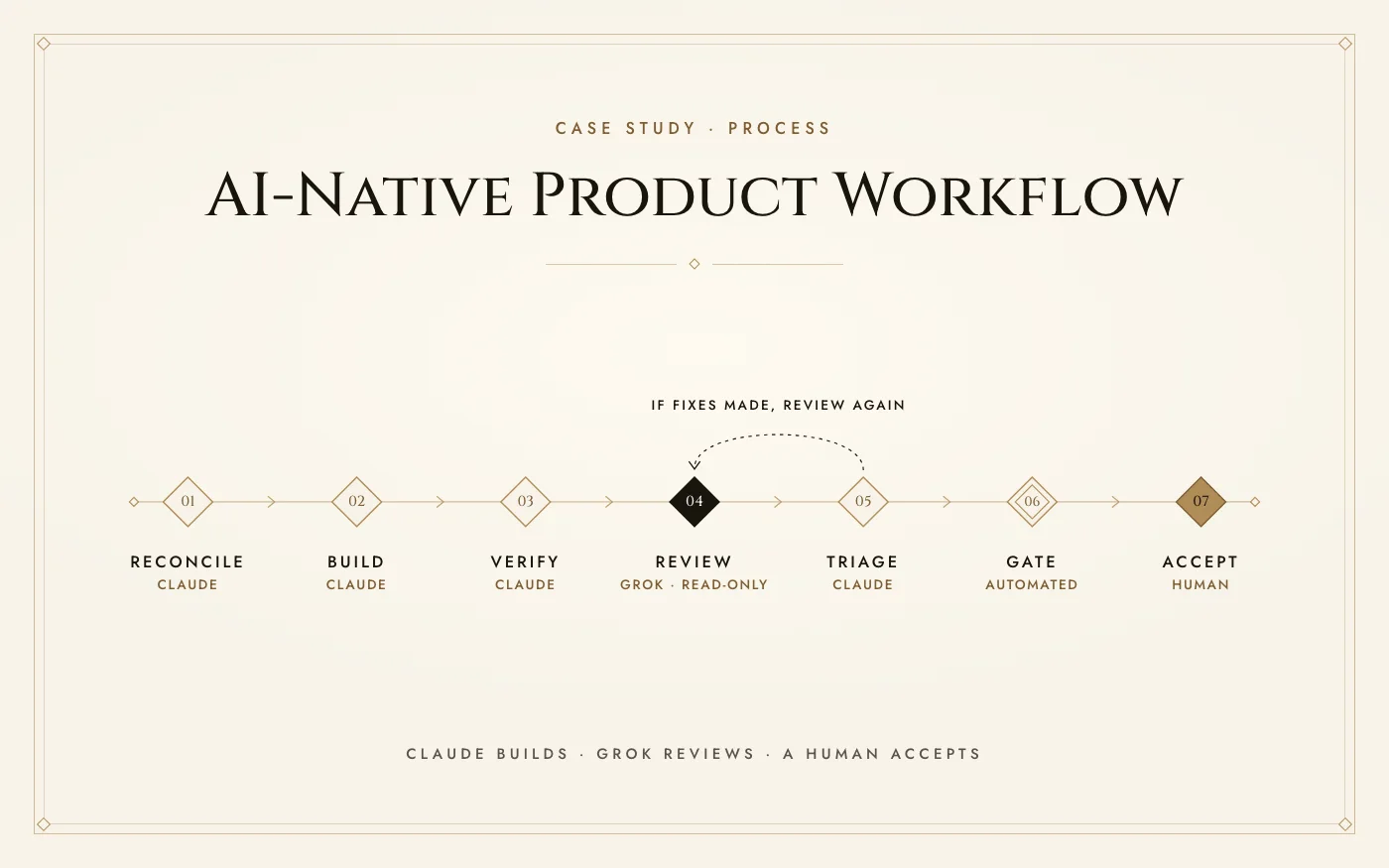
Every change request on Musterhall runs the same seven steps.
- Claude, builder
- Grok, reviewer
- Automated gate
- Human gate
- Reconcile. Before any code is written, Claude reads the ticket, the spec, the mockup and the actual current code, and verify every claim.
- Build. Claude writes the change.
- Verify. Claude re-runs every automated check: types, code style, tests and the build. Then it breaks each new test on purpose to prove it works: undo the line the test protects, confirm the test fails, put the line back.
- Review. Grok, a different model family, reviews with read-only access and tries to break the work, not bless it. Its findings are claims, not verdicts.
- Triage. Claude checks each finding against the code and fixes the real ones. If fixes were made, the change goes back to review.
- Gate. An automatic check blocks any broken build before it is pushed.
- Accept. The ticket moves to ready to test and comes to me for design acceptance. A human merges. The AI session never merges to main.
It starts with reconciling. The ticket, the spec and the mockup are claims until the current code agrees with them, so the first job is to read all of it and check every claim. Then Claude builds and runs every automated check: types, code style, tests and the build. That is checking, not reviewing. Next it breaks each new test on purpose: undo the line the test protects, watch the test fail, put the line back. A test that has never failed hasn’t proven anything.
After that the work leaves the builder. An automatic check blocks any broken build before it’s pushed, the ticket moves to ready to test, and it lands with me for design acceptance. A human merges. The AI session never merges to main.
Where design fits
I design the screens. Agents build the mockups and the code from my direction, and what they build comes back to me to accept against the design.
On Musterhall, the design system (colors, type, spacing and component rules) is packaged as an agent skill: a set of instructions the agent loads before any design work starts. So agents build on the system instead of near it. Here is how it reads, quoted from the skill:
Colour encodes; it never decorates.Green may write, it may not outline.Borders are never green.Never hardcode a colour, radius or type value. Consume the tokens by name.Spacing comes from `--space-0..9` only.An undefined custom property is silently dropped and the element inherits.To check a token exists: grep the emitted CSS, not the spec.For cross-file consistency sweeps, write a deterministic script, don't ask an agent to eyeball 29 mocks.Musterhall design-system agent skill, the non-negotiables and how to verify a claim
The skill tells an agent what the rules are. Code backs them up. A lint rule that runs before every push rejects hardcoded hex colors and raw z-index values. A test fails on bare references in the app’s code to tokens that don’t exist. And a script checks each HTML mockup’s spacing, type, radius and color use, written after agent judgment missed a dozen off-scale values in a single mock.
The split of ownership is clear. I own what we build and how it looks and feels. My mockups live as prototypes that never merge into the product. Engineering owns the production wiring. When a ticket is built and reviewed, it comes back to me, and it isn’t accepted until the design is.
- Anything sent to a person or another team's bot is shown to me first, and I send it
- Design acceptance on every ticket
- Closing tickets
- Merging to main
One ticket, end to end
One real change request, traced from spec to merge: a Share control on the course page.
- Spec. I wrote the build spec: share controls on five public surfaces, a fallback sheet where the phone’s share sheet isn’t available, and link attribution that counts arrivals without tracking people. It cites the code it builds on, line by line, so the builder starts from what is actually there.
- Mockup. The handoff mockup is built from the real tokens and passes the same mockup checks. Share is an outline control with no green, next to the page’s one filled primary, Buy.
- Pattern pass, then a split. Before building, a sourced look at 13 products showed share living on the detail page or behind an overflow menu. Only one put it on cards. So I split the ticket: the control ships now and the measurement work waits. The ruling also moved Share beside the title, never beside Buy.
- Build. Claude built it, reusing the existing share button and moving its off-scale gap onto the spacing scale. It goes icon-only on phones, and a review fix made it a 48px square on touch.
- Review. Grok, with read-only access, flagged a high-severity issue. After a copy, the button’s visible text changed to “Link copied” but its accessible name still said “Share”, and nothing announced the change. A screen reader user got no confirmation that anything happened.
- Fix. The name now leads with the visible label, and a polite status region announces the copy, matching the copy-link button the product already had. A test pins it, and the fix was reverted on purpose to prove the test fails without it.
- Merge. A human merged it. The AI session never merges.

- aria-label={ariaLabel}+ // WCAG 2.5.3 while copied: the visible text becomes "Link copied", so the+ // name must contain it too (the CopyLinkButton idiom, Grok refute+ // 2026-09-24). The status region below is what announces the change.+ aria-label={ariaLabel ? (copied ? `${copiedLabel}, ${ariaLabel}` : ariaLabel) : undefined} ...+ <span className="sr-only" role="status" aria-live="polite">+ {copied ? copiedLabel : ""}+ </span>The fix commit in the product repo. The comment cites the review that caught it.
It’s a small bug, and the kind no visual review catches: the screen looked right. It was caught by a reviewer that could only read the code and was told to break it.
How it all connects
The loop doesn’t live in a chat window. Agents work inside the same tools the team uses: they read specs from the vault, update ClickUp with evidence, and their activity shows up in Slack next to everyone else’s.
How it all connects
- Truth The vault Specs, decisions and the design law, as files agents read before they build.
- Status ClickUp Every ticket and its evidence. Agents update the task in the same session, with the file and line.
- Conversation Slack Where people talk. GitHub and ClickUp post into a muted feed channel, so activity is visible without noise.
- Code GitHub Every change lands as a reviewed pull request. A human merges.
- Ops Cursor Runs Git and Vercel tasks from inside Slack, so the team can act where it talks.
- Comms Gmail & Meet AI drafts email and automates the inbox. Google Meet transcripts and its AI features cover the calls.
Two families, used on purpose
I don’t run everything through one assistant. Claude works through Cowork and Claude Code. Grok works through Grok Bot: my own, always on and running scheduled jobs on my build box, plus the team’s shared bot. Most tasks could go to either, and I move work between them on purpose.
Two model families, side by side
Claude
- Cowork Docs, decks and files, research and planning, design work
- Claude Code Builds the site and product code, in the change-request loop
Grok
- My Grok Bot Always on: scheduled jobs like a daily job tracker, research, drafts, build-box tasks
- The team’s Grok Bot Shared build and ops tasks for Musterhall
- Grok, read-only Reviews and second opinions on work Claude produced
Most tasks can go to either. Which one gets it is a choice.
- Compare outputs Run the same task on both and keep the stronger result.
- Different strengths Route each task to the model that does it best.
- Catch blind spots A different family catches what the first one missed.
- Availability & cost Limits, speed and cost decide who takes a task.
Why builder and reviewer are different models
A model checking its own work is mostly checking its own assumptions. It shares its own blind spots. So Claude builds and Grok, a different model family, reviews. Grok gets read-only access and one job: try to break the work, not bless it.
Its findings are claims, not verdicts. Claude checks each one against the actual code, fixes the real ones, and sends any fixes back for another review. The rule exists because on early tickets, reviewers on other models caught serious bugs the builder had already shipped.
What the loop actually catches
These are more real catches from the loop, told without product details. Most are the quiet kind of bug that looks fine in a demo.
- A data request that threw away its error and reported a false state instead, like “not owned” or “not started.” On anything tied to money or access, that is a trust problem. The fix: fail closed, never a false answer.
- A progress display that rounded up and marked something complete before it was. The fix: decide "complete" from the real count, not the rounded number.
- A retry loop with no limit, so a file that wouldn't play could keep the screen retrying forever. The fix: cap it.
- Tickets that turned out to be already built. Reconciling against the real code first meant nobody built them twice.
One rule sits on the design side. Once a spec is frozen for sign-off, the words on screen have to match the approved copy exactly. If a build needs a new line of text, it ships flagged for my sign-off. It never slips in quietly.
Routing agents by task
Not every task needs the strongest model. The rule: the cheapest model that does the job at full quality.
The cheapest model that does the job at full quality
- Small
- Mid
- Top
- Different model
- The harder it is to undo, the more effort it gets.
- When models disagree, escalate. Don’t average.
- Product scoping and tickets go to a top-tier model at high effort.
- Research and teardowns go to a mid-tier model.
- Mockups built from my designs go to a mid-tier model at high effort.
- Design critique that hunts for flaws goes to a different, top-tier model at max effort.
- Repetitive, mechanical edits go to a small, fast model.
- Checks with one right answer become scripts, not AI prompts.
Two principles settle the edge cases. First, the harder something is to undo, the more effort it gets. Scoping a product is hard to walk back, so it gets a top model thinking hard. A repetitive edit is easy to redo, so it gets a small, fast one. Second, when two models disagree, I escalate instead of averaging their answers. And anything with one right answer doesn’t get a model at all. It gets a script.
Rules as code
When a rule keeps getting broken, I don’t write another reminder. I build a check that makes the mistake fail loudly, so nobody has to remember. Written instructions come last.
- An automatic check that blocks broken builds before they are pushed
- Checks with one right answer run as scripts, not AI prompts
- A lint rule, run before every push, that rejects hardcoded hex colors and raw z-index values
- A test that fails on bare references in the app code to design tokens that do not exist
The evidence ladder
“Done” is the easiest word for an agent to say. A checkmark is easy to produce. So every claim of done sits on a ladder, and only the top rung counts. This part runs on both products.
On the client side
Submitted is not Client-accepted
Done and accepted are different states. Sending it is not the finish line.
- Tier 1, checked at the source (artifact-verified): someone opened the actual file or export and can point to the exact place. This is the only basis for proposing to close a task.
- Tier 2, someone said so (attested): a commit message, a checkmark, or someone saying it was done. Not enough to close.
- Tier 3, a best guess (inferred): reasoned from context without opening the file. Not enough to close.
- At the top of the ladder, a human closes. Agents can only flag candidates.
Tier 1 means someone opened the actual file or export and can point to the exact place. That is the only basis for proposing that a task is closed. A commit message, a checkmark or someone saying it’s done is Tier 2, and it isn’t enough. Neither is a guess. Agents can flag candidates. A human closes. On the client engagement the same idea has its own name: submitted is not accepted.
What this means for a team I join
You get a designer who designs the screens and can take them from spec to a reviewed, working prototype. Review is built into the loop, not bolted on at the end. And things don’t get called done before they are, because done has a standard and a human signs it.
Outcome
On Musterhall, specs become reviewed, working builds with a human at every gate. On both products, a human decides when something is done. Agents do the volume. I keep the judgment: what gets built, how it looks, and when it is actually done.