Musterhall Design Language
Co-founder & Product Design Lead · Side venture, part-time · Pre-launch
The visual language and token system I designed for Musterhall, a pre-launch side venture building a trends and knowledge learning platform. One token source, web and Flutter.
- Role
- Co-founder & Product Design Lead
- Timeline
- 2025 – Present
- Platform
- Web + mobile design system
- Tools
- Claude Code, ClickUp, Style Dictionary, Storybook
At a glance
- The problem
- One brand green did every job, so it meant nothing. Web and Flutter also needed the same numbers.
- What I did
- As co-founder I lead product and UX/UI: I run the backlog in ClickUp, scope features, write the specs, own the mocks and give design acceptance on what ships (see the AI workflow case). Here, the system: I own every token value, wrote it as an agent skill, and sign off the production walks. Engineering owns the build.
- Key decision
- Color encodes. It never decorates. Green split into identity and action. Status got its own hues, metadata none.
The system in the product
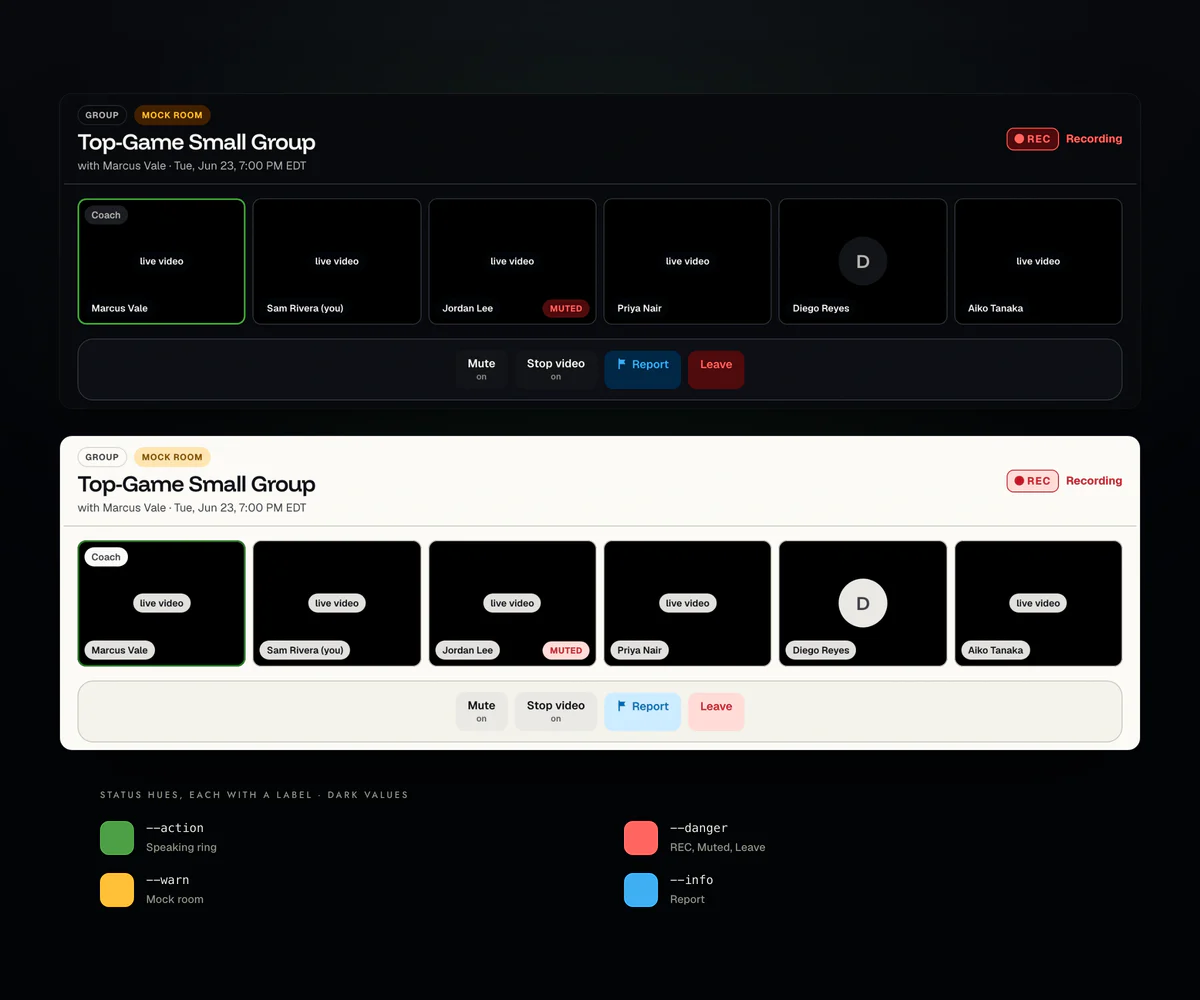
Pre-launch. Storybook captures of the shipped components with fixture data, in both themes; the featured course photo comes from the product mockups. Token chips use the same values as the plates below.
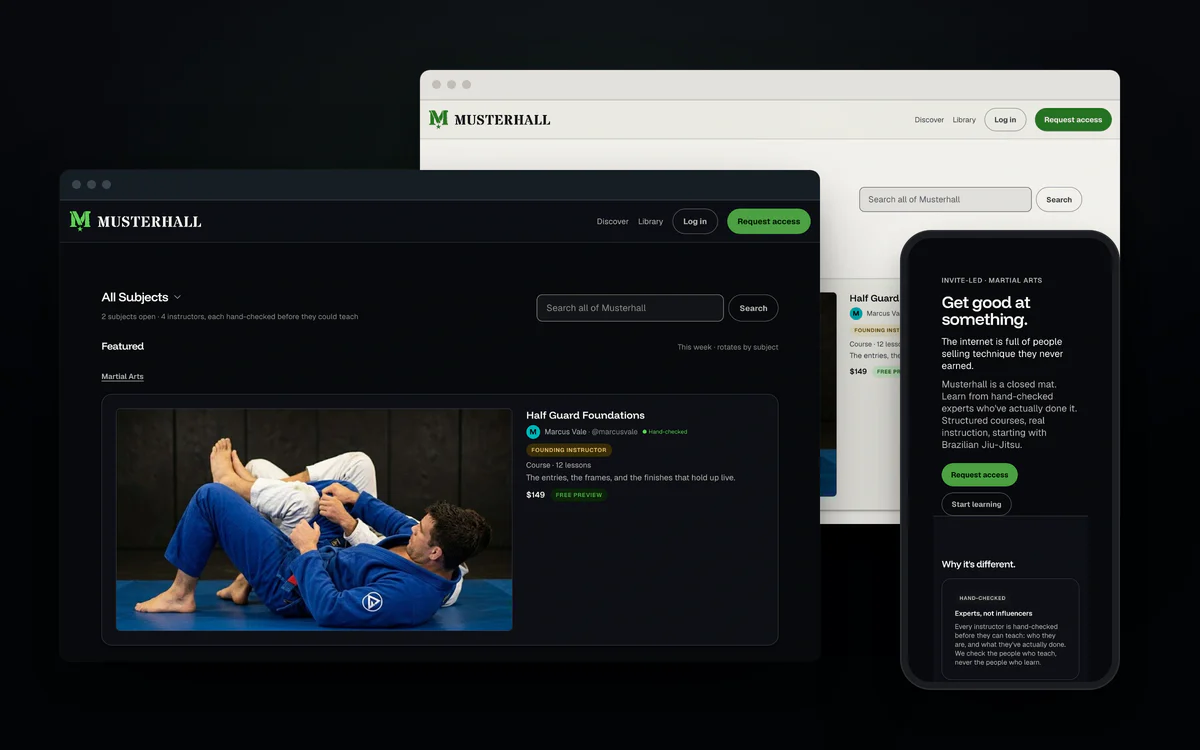
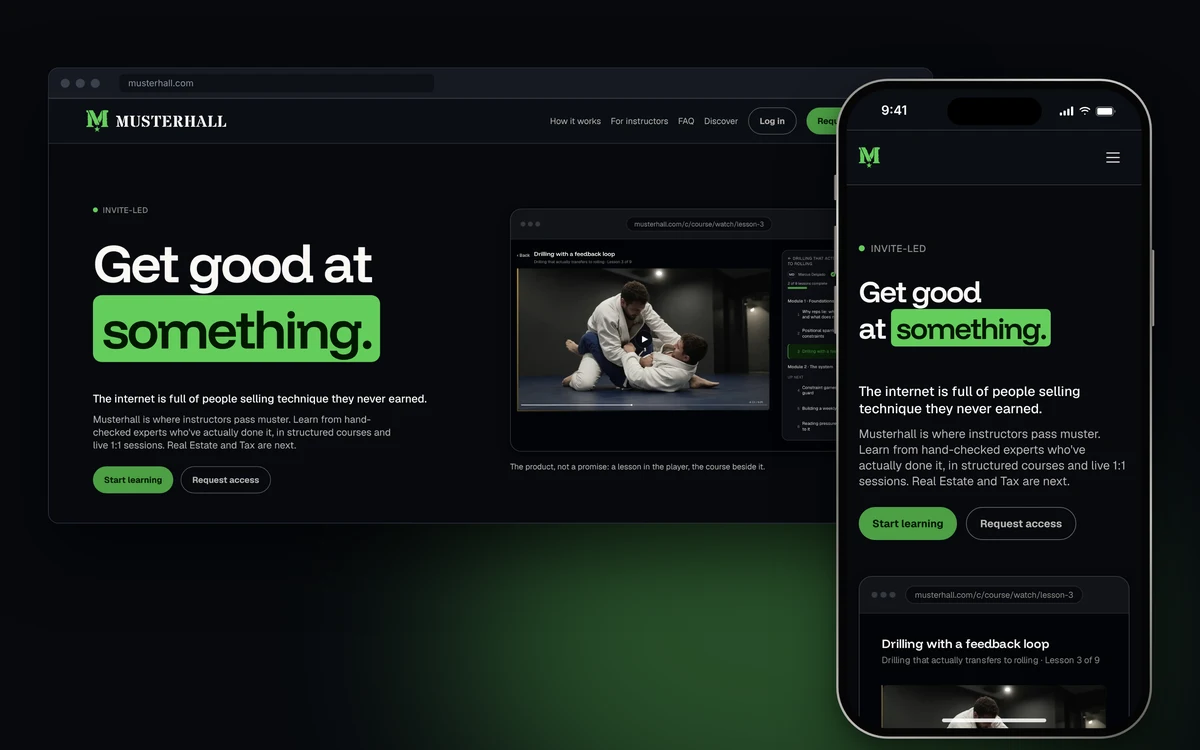
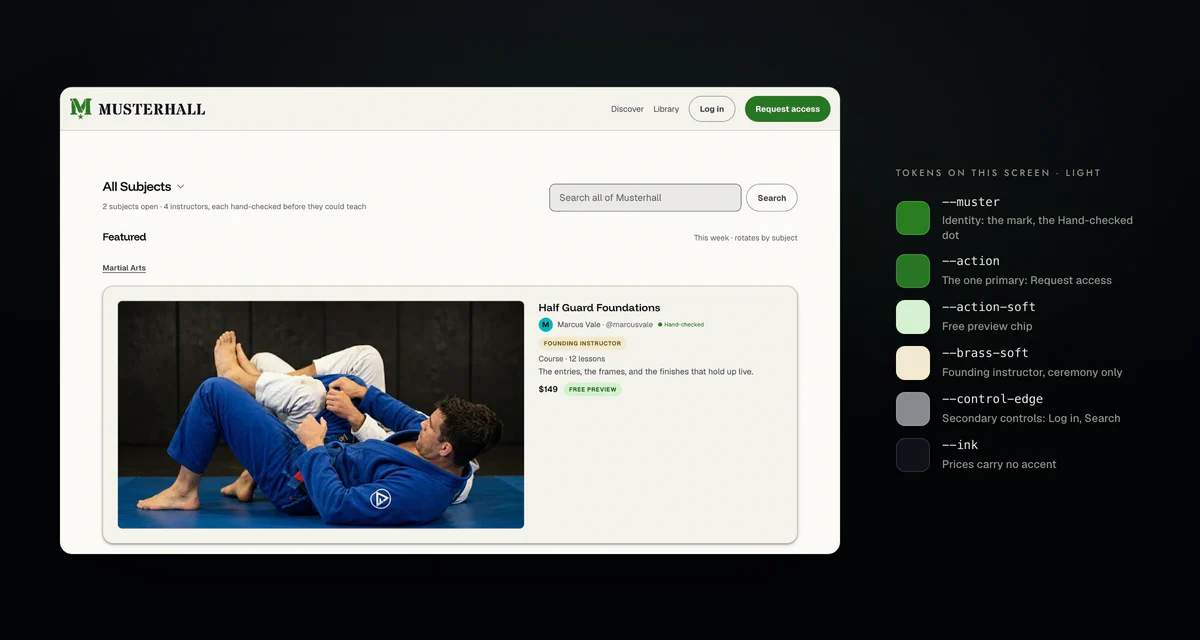
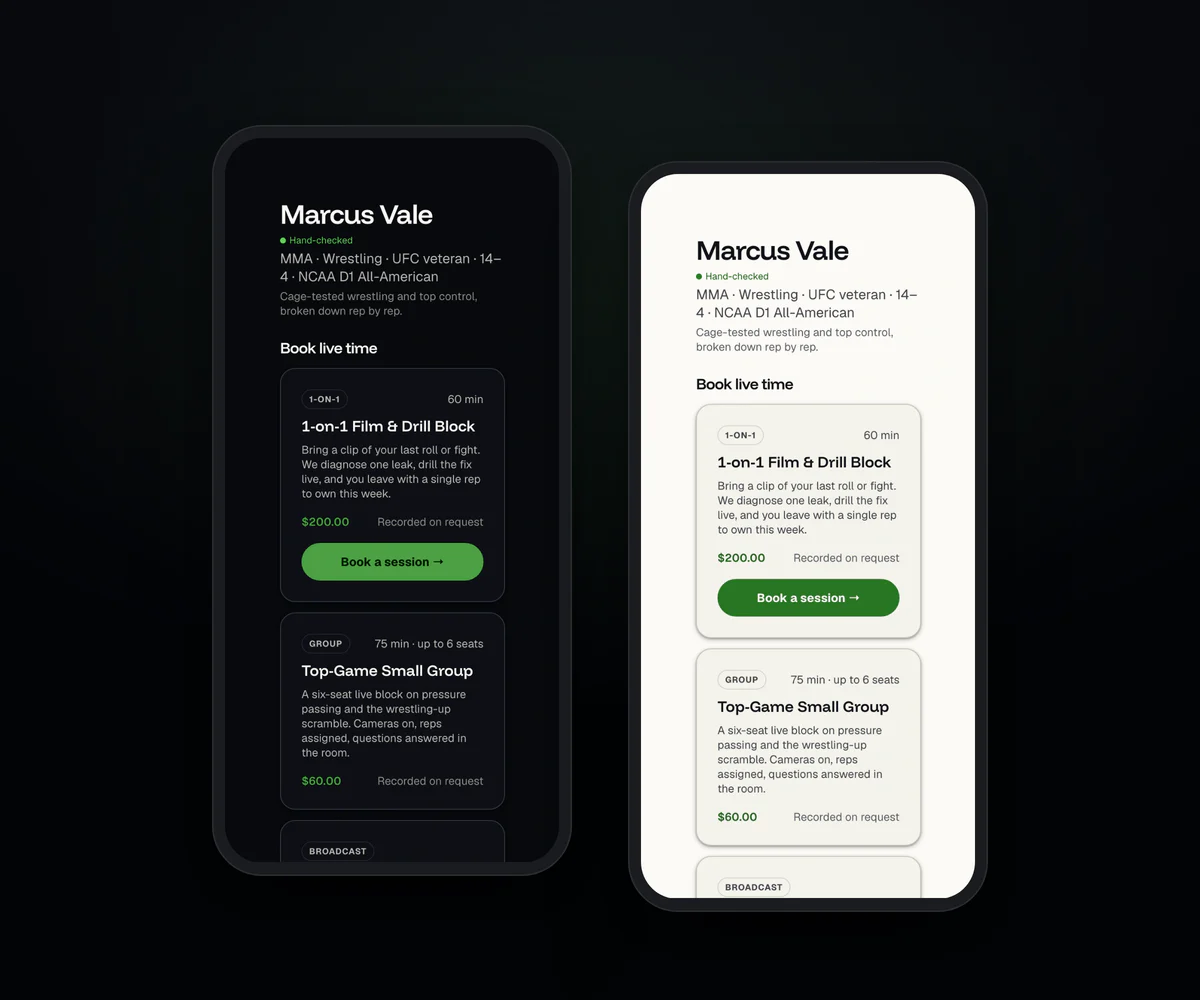
Overview

Musterhall
I’m a co-founder and lead product and UX/UI.
Every plate is rendered from the real tokens; every contrast figure is computed at build. The reasoning and evidence sit in the deep dives under each plate.
Decisions and tradeoffs
As co-founder I lead product as well as the system. These calls shaped it, each with what it cost.
- Split the brand green into two jobs. One chartreuse did identity, verification and every buy button, so it meant nothing. I moved it to a true green with two roles on one hue. The cost is a strict green budget that every screen has to respect.
- Code is canonical, not Figma. I deferred a Figma library on purpose, because a hand-built twin would drift from the shipped tokens. The cost is no Figma library to pull from. The written spec and the Storybook catalog stand in for it.
- Each app pins its own tokens. Web and Flutter consume one source, but a token change lands only when each app re-pins. That trades speed for control over when a change ships.
- Measured, with the gaps listed. Contrast is computed, and where the system falls short the page says so instead of hiding it.
Color encodes. It never decorates.
- Identity
--musterThe mark and verified badge, once per component.
Dark theme: Verified#65cd5cLight theme: Verified#297d22 - Interactive
--actionFills, links, focus.
Dark theme: Primary#4d9f45Light theme: Primary#297623 - Positive
--okNon-money positives.
Dark theme: Approved#2fbebeLight theme: Approved#007375 - Informational
--infoIn progress.
Dark theme: In review#3faff3Light theme: In review#006ab4 - Caution
--warnDrafts, retryable failures.
Dark theme: Draft#ffc039Light theme: Draft#7d5100 - Serious
--dangerErrors, destructive states.
Dark theme: Declined#ff6661Light theme: Declined#c21725 - Broadcast
--liveA badge, not a control.
Dark theme: Live#ff6661Light theme: Live#c21725 - Ceremony
--brassOnly what is earned.
Dark theme: Founding#d9ba70Light theme: Founding#70570f - Metadata
--ink-2Prices and counts: no accent.
Dark theme:#b9b7b2Light theme:#404249
Deep dive Role notes
- Identity. The mark and the verified badge, at most once per component. Not a button, link or chart.
- Interactive. Primary fills, links, selection and focus.
- Positive. Non-money positives such as connected, published and approved. Teal, kept off the green band on purpose.
- Serious. As a control, danger is always an action, not a badge.
- Broadcast. The same red hue as danger with a different job: a dot and a label, no fill, so it can’t read as a button.
- Ceremony. Metal, not color. Not interactive, not a status.
- Status always pairs an icon with a label.
Deep dive Why green was split One hue, two roles, and a budget every screen respects.
The base is neutral: ink on charcoal, or on warm parchment in light mode. Color is spent only where it carries information.
One chartreuse used to do identity, verification and every buy button. I moved it to a true green and split it into two roles on one hue.
Edge cases are written down: a confirmed booking wears teal, a payment marked paid keeps green, and something still processing wears neither. One exception to the budget: a single hero money figure per surface may wear action green.
- Step 50
#c5fdbfNo dark theme role No light theme role - Step 75
#d6f1d2No dark theme role Light theme roles: action-soft - Step 100
#9cf093No dark theme role No light theme role - Step 150
#65cd5cDark theme roles: mustermuster-text No light theme role - Step 200
#5db655No dark theme role No light theme role - Step 250
#4d9f45Dark theme roles: actionaction-text No light theme role - Step 300
#3a8c32Dark theme roles: hover No light theme role - Step 350
#297d22Dark theme roles: press Light theme roles: muster - Step 375
#297623No dark theme role Light theme roles: action - Step 400
#1c6316No dark theme role Light theme roles: muster-textaction-texthover - Step 450
#0b3807No dark theme role Light theme roles: press - Step 475
#0e230cDark theme roles: action-soft No light theme role - Step 500
#031802Dark theme roles: muster-inkaction-ink No light theme role
The green budget
- Law 1
One identity green per component.
Verified - Law 2
One solid primary per surface.
Primary Secondary Tertiary - Law 3
Green may write. It may not outline.
Not allowed: a green border on a secondary buttonTertiary Allowed: green text on a tertiary action - Law 4
Meta rows carry no accent.
Data viz: the chart law
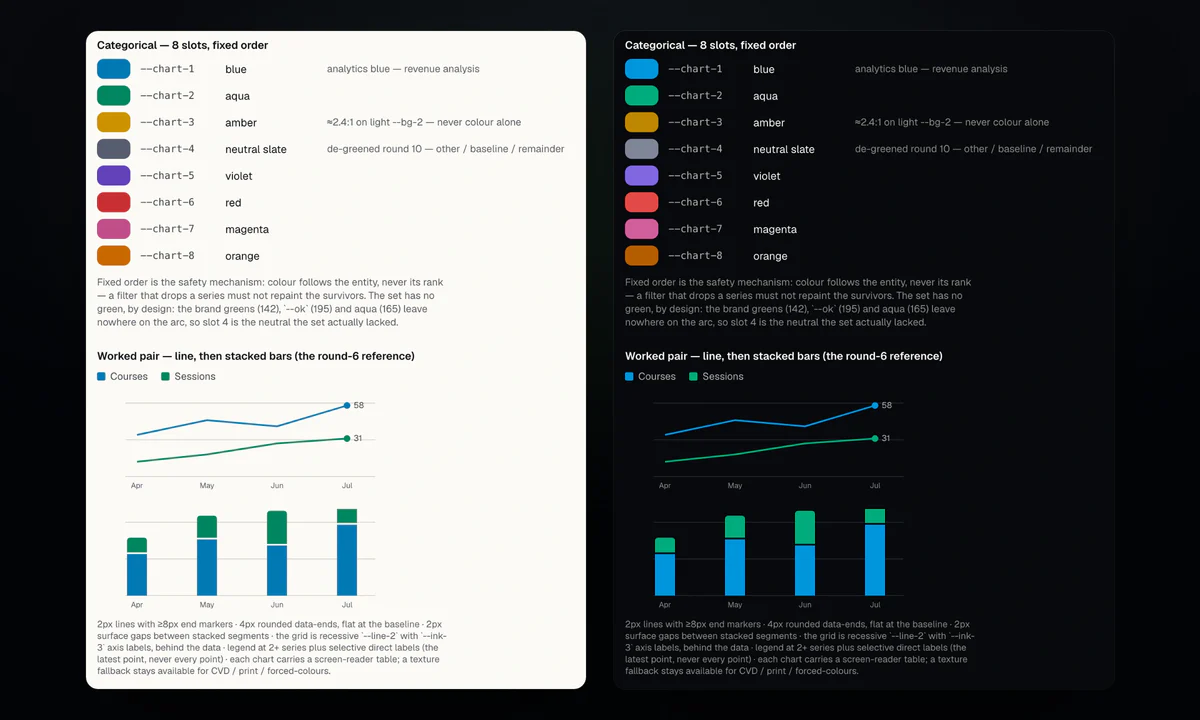
Eight categorical slots in a fixed order, no green, and status hues kept out of series, checked against a simulated deuteranopia view.
Categorical, fixed order, not cycled
- 01 Blue Revenue analysis
- 02 Aqua
- 03 Amber Labelled directly in light
- 04 Slate Other, baseline, remainder
- 05 Violet
- 06 Red
- 07 Magenta
- 08 Orange
Deep dive Colorblind simulation
No green slot. Slot 4 was a green three degrees off the brand hue, so it became a neutral slate. Amber measures 2.60:1 on light (computed), so it always carries a label.
Simulated deuteranopia
Simulated, not observed. Slate and magenta, aqua and magenta, and red and orange converge, so series should be labelled directly. That is my reading of this check, not yet a written rule.
Why chart hues can sit near status hues
The rule bans reusing a status token as a series, not sharing a hue. A plot mark and a status chip with an icon and label differ in form and context. Green is the exception: a series that reads as the brand mark is a real misread.
Components and states, measured
Dark
Light
Deep dive State rules
Hover moves one step, press two, hover only under a fine pointer. Disabled is 0.6 opacity. Focus is a 2px action outline. Measured gap: in light, the ghost press step equals the page ground, so only the 0.98 press scale shows it.
An action inside a status tint
A ghost in the card’s own ink, weight 600.
Deep dive The contrast ledger Every pairing computed, including where the system falls short.
Found by measuring, open in the system
| Pairing | Used for | Bar | Dark | Light |
|---|---|---|---|---|
--action-ink / --action-hover | Primary label, hover | 4.5:1 | 4.38:1below | 7.06:1pass |
--action-ink / --action-press | Primary label, press | 4.5:1 | 3.56:1below | 12.70:1pass |
--ink-4 / --bg-2 | Placeholder text | 4.5:1 | 3.18:1below | 3.11:1below |
--bg-4 / --bg | Ghost press fill | n/a | 1.18:1visible | 1.00:1no change |
Deep dive Full ledger
Resting pairs
| Pairing | Used for | Bar | Dark | Light |
|---|---|---|---|---|
--ink / --bg | Primary text | 4.5:1 | 18.77:1pass | 18.06:1pass |
--ink-3 / --bg | Captions | 4.5:1 | 5.91:1pass | 6.28:1pass |
--action-ink / --action | Primary label | 4.5:1 | 5.60:1pass | 5.41:1pass |
--ok / --ok-soft | Status on its tint | 4.5:1 | 6.36:1pass | 4.69:1pass |
--control-edge / --bg-2 | Control boundary | 3.0:1 | 3.18:1pass | 3.11:1pass |
--ink-4 / --bg-2 | Disabled text | n/a | 3.18:1exempt | 3.11:1exempt |
--line / --bg | Divider | n/a | 1.69:1exempt | 1.67:1exempt |
Fixed by measuring, light theme
Positive status: 52% to 49% lightness
Teal copied its siblings’ nominal lightness and missed AA. New tones are now matched by measured contrast.
Identity as text gets its own token
Identity green is graphic-grade on raised ground. Verified labels now use a text-only token one rung darker.
Text needs 4.5:1, 14px bold included; boundaries need 3:1. Disabled controls and dividers are exempt. The token comment still assigns placeholder text to the disabled ink.
Deep dive What the system does for the person using it
- Rule: Green means identity, action or moneyThe person experiences: Green is never decoration, so it is worth noticingPrevents: Trust color on every price and button
- Rule: Status pairs an icon with a labelThe person experiences: Status reads without telling hues apartPrevents: Meaning carried by color alone
- Rule: One solid primary per surfaceThe person experiences: The next step is obviousPrevents: Two asks competing for attention
- Rule: Control edges clear 3:1The person experiences: You can see what is clickablePrevents: Buttons that vanish into the page
- Rule: LIVE is a dot and a labelThe person experiences: Status doesn’t look pressablePrevents: Tapping a badge that does nothing
- Rule: Low-contrast chart slots carry a labelThe person experiences: Every series can be namedPrevents: A chart only some readers can read
Deep dive The stated reasons, and more rules
- Green. When everything is colored, color means nothing. One chartreuse once did identity, verification and commerce, so buy buttons wore the trust color. Prices, counts and roles now carry no accent.
- Status. Status tones are reserved and always shown with an icon and a label. A status icon matches its subject, so color encodes severity and the icon encodes what.
- One primary. A page may repeat its one ask, but not run a second, different accent fill. Peer rows carry no fill, so peers can’t have different prominence.
- Control edges. “A bordered button announces itself by shape” is only true if the shape is perceivable. The divider token measured too low for that, so controls got their own edge token.
- LIVE. A solid green pill read as a button and doubled the green beside real ones. The pulse moves a ring instead of fading the dot, because a fading dot dropped below 3:1 mid-cycle.
- Charts. The amber slot measures low on light grounds, so it needs a direct label or a table, not color alone.
- Touch. Targets are 44px, 48px under a coarse pointer, and every tappable shows a press state.
- Waiting. Skeletons where the shape is known, and determinate progress where the length is known: a spinner standing in for a known wait misleads.
- Motion. Reduced motion turns movement off; only short opacity fades remain.
Type
-
Display.
-
Stage voice.
-
Card heads
-
Titles
-
Ledes
-
Body copy
-
Labels
-
Chips
-
Micro
The UI band is closed
- 16px
- 13px
- 11px
- 10px
Deep dive The closed band
Specs: H1 fluid 40 to 124px, 600, −0.04em. H2 fluid 34 to 88px, 600, −0.035em. H3 22px, 600. Title 18px, 600. Lede fluid 17 to 19px. Body 16px, 400, 1.5 line height, 60ch measure. Label 13px, 500. Chip 11px, 700, 0.04em. Micro 10px, 600, 0.06em.
No step may be added between 16, 13, 11 and 10. 14 was requested twice and refused; both requests resolved to 13. Its one named use is the pill button label, derived as the label size plus 1px. Display scales with the viewport; the UI band doesn’t, but still honors a 200% system text scale. Chip and micro are shown here at true size.
Deep dive Two faces
Funnel Display is for moments. Geist is for everything else.
The mark family





Deep dive Why it looks the way it does
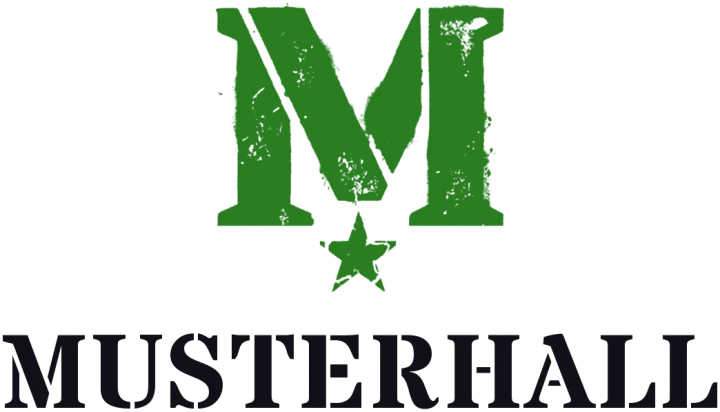
A muster is a military assembly. The name says it: every instructor here passes muster. The register is on-theme for the name, not borrowed style, and two of Musterhall’s founders are veterans. So the military touches are built in: a stencil M with a rally star, a true green that leans military and reads earned, not gamified, brass kept for rank and ceremony, and a plain voice wherever money moves.
- 01 The muster point A green dot before the word: the spot where people assemble.
- 02 Explorations Marks off muster, hall and rank, drawn and reviewed side by side.
- 03 The crest Heraldry, the most hall-native idea; my own artwork became the emblem.
- 04 Stencil M and rally star The military register made literal, and decided.

Deep dive How the mark got here
- The dot. The first identity rule made the green dot lead the word and named it the muster point: the marked spot where people assemble. Losing green was acceptable in one-color print; losing the dot was not.
- Explorations. I asked for alternatives that played off muster, hall and military: an assembly point, a chevron that reads as both rank and the hall’s roof, a monogram drawn as a gabled hall. Then I redirected: the dot isn’t mandatory, more range, simplicity first. Every candidate went into one catalog, judged side by side at icon size and at a true 16px.
- The crest. My brief was a simple shield. Heraldry turned out to be the most hall- and military-native idea, so the work narrowed to the crest family, less intricate, and the crest replaced the dot. My own counterchange artwork, a shield split down the middle with a Pomeranian inverting across it, became the app emblem.
- The stencil. I supplied the stencil M with a rally star, set beside MUSTERHALL in a stencil face whose bridges match the mark’s cuts. The stencil face is logo-only; the product stays in Funnel Display and Geist. The identity slot and its one-green budget didn’t change, only the glyph. The dog left the mark, not the brand.
- The green. The old chartreuse sat in the crowded esports lane and read gamified, not earned. It moved to a true green, and brass arrived for what is earned: rank, certificates, ceremony. Rank, when it exists, is a metal ramp from bronze to pewter to gold, the way insignia encode it.
- The voice. The military register (muster, roll call, standing by, in good standing) is load-bearing brand, but it lives in what you do, not what you buy. Money and destructive controls stay plain: Join, Membership, Cancel.
Deep dive Usage rules
The monogram replaced an earlier crest emblem. The M and the star are one mark and are not separated. The cut follows the displayed size: the textured artwork at 128px and up, a clean cut below 64px with texture off and stencil bridges kept, and an ultra cut at 16px with the bridges sealed. Below a readable wordmark size, the mark goes alone. The ink grammar is fixed: duo is the primary, with dark-ground files on dark grounds and light-ground files on light. Mono ink is the default once a surface has spent its green. Brass and one-color green lockups are for ceremony and single-ink print only, so they are not shown here. The source is still a raster, so large-format and vector jobs wait for a redraw.
Built, checked, and readable by agents
One token source feeds web and Flutter. The design law ships as an agent skill, tokens named for their job, and checks that fail loudly, so engineers and agents make everyday token calls without waiting on me.
Deep dive One source, two platforms
- Authored once
tokens/primitives.jsontheme/semantic.jsontokens/*.json
- Built and checked
build.js
- Generated, never hand-edited
- Web
build/css/tokens.css - Web
build/ts/*.ts - Mobile
Dart, Flutter package
- Web
Deep dive Pipeline detail
tokens/primitives.json- Per-hue OKLCH ramps. Internal only.
theme/semantic.json- App-facing roles, each with a dark and light value.
tokens/*.json- Radius, space, type, motion, layout, state.
build/css/tokens.css- OKLCH verbatim. Light under [data-theme="light"].
build/ts/*.ts- Constants for code that can’t read CSS variables.
Dart, Flutter package- sRGB colors with the OKLCH source as a comment. Themes as a ThemeExtension.
build.js- Style Dictionary, plus an OKLCH to sRGB converter. Tests and a CI check for stale outputs.
The same token, two platforms
--vert-250: oklch(63% 0.15 142);
--action: var(--vert-250);

--action: var(--vert-375);/// oklch(63% 0.15 142)
static const vert250 = Color.from(alpha: 1, red: 0.3009, green: 0.6235, blue: 0.2707);
static const action = Color.from(alpha: 1, red: 0.1613, green: 0.4625, blue: 0.1355);Tokens that can’t cross to Flutter sit on a web-only list, each with a reason. Shadows are on it: mobile is flat by ruling. The emitter throws on an unknown type, so nothing drops silently.
I own the token values. Engineering owns the build and CI. Each app pins its own copy, so a token change lands only when that app re-pins.
Deep dive Docs and checks
What fails the build
- Lint Raw hex and token literals
- Lint Em dashes in product copy
- Guard test A var(--token) with no real token
- Guard test A text size off the ramp
- Catalog test Chart slot 4 turning green
- Token tests Decided colors drifting
Deep dive The catalog
The lint rejects raw hex, z-index and other token literals in components, and em dashes in product copy. One guard test fails any var(--token) that names a token that doesn’t exist, which the browser would drop silently; another fails any text size off the ratified ramp. A catalog test fails if the neutral chart slot is reverted to green. Token tests pin the decided colors, font stacks and breakpoints. CI fails a change whose generated outputs are stale.
The catalog groups color by role
Identity --muster
Scarce. The mark and the verified badge only, at most once per component. If it is interactive it is --action.
-
--muster#65cd5c -
--muster-ink#031802
The written spec is the source of truth. The Storybook catalog shows each token live, with its rule beside it. I deferred a Figma library on purpose: code is canonical, and a hand-built twin would drift. Reasoning also travels in the emitted CSS. The hover token’s comment:
One ramp step darker than rest; darken only, because lightening collides with
--muster(vert-150).
Token work moves in numbered rounds: a written decision, then an emit and tests. Before a round merges, a reviewer on a different model tries to break it, and I check each finding against the source. On rounds 12 and 13 that step corrected citations, narrowed a Flutter claim and recomputed a control-edge figure.
Deep dive Designing a system agents can build with
On Musterhall, agents write most of the code. A design system in a file someone has to remember to open doesn’t survive that. So the design law ships in three forms an agent can use and a machine can check.
- A skill for design work. Agents load the system as a skill: the non-negotiables, one reference per topic, and links to the sources. Rules are written as instructions, such as “Never hardcode a colour, radius or type value. Consume the tokens by name.”
- Tokens named for their job. A control edge uses
--control-edgeand a buy button uses--action. When the name says what it’s for, the right choice is the obvious one, for a person or a model. - Checks that fail loudly. A lint rule that runs before every push rejects hardcoded hex colors and raw z-index values. A test catches references to tokens that don’t exist, and a script checks mockups for off-scale spacing, type and color.
So engineers and agents make everyday token decisions without waiting on me. Design acceptance still happens on every ticket. My time goes to the calls a rule can’t make, like a new pattern or an edge case the law doesn’t cover yet.
Non-negotiables come first, then one reference per topic and links to the canonical sources. When skill and spec disagree, the spec wins. It also says how to prove a claim: search the emitted CSS for a token, measure a contrast before quoting it, script cross-file sweeps.
Skills load when the model judges them relevant. One token round ran without it, so the token repo’s guidance now requires it. The wider workflow is in AI-Native Product Workflow.
Deep dive Checked on production Production walks against the verification standard.
These are acceptance walks on production, run from written scripts with a phone learner and a web host on test accounts, and signed off by me. They are not research sessions with real users, and that kind of testing is still ahead.
- Observed: After the phone rejoined, the host saw “Camera off” while the learner’s camera was on.Finding: The state misreported the camera.Proposed: An honest-states rule: reconnecting keeps the last frame dimmed with a banner, and “Camera off” means off.
- Observed: On the terms screen, the walk checked the button tiers in both themes.Finding: One solid button, a bordered neutral Log out, no green border.Passed: None needed. The tier rules held on production.
- Observed: A walk found secondary buttons still outlined in green.Finding: Right about the live state; the fix was already waiting in an open change.Process: A walk finding is now checked against open changes before it is filed.
Deep dive How the walks run
- Each walk follows a written script with pass and fail boxes. A row that couldn’t be run stays open; it is not counted as passed.
- Every row records what was actually seen, and the build that was walked. A human closes the ticket, not an agent session.
- A step that the docs and code don’t support is marked unverified. It is walked anyway, and what happened is written down.
- One more observation: a phone learner couldn’t see the host’s shared screen. It is open as a mobile gap, and the full-screen video brief requires phones to show it.
- The same brief proposes the next layout: the remote person fills the screen, the self-view floats, and controls stay at the 44 or 48 touch floor.
Deep dive How AI was used
Designing for AI
- A design system agents can read and machines can check: an agent skill, tokens named for their job, and lint that fails loudly
Designing with AI
- Claude builds token rounds and screens from my specs. Before a round merges, Grok, a different model, tries to break it, and I check each finding against the source
- Specs, tickets and reviews run through connected tools: the vault, ClickUp, Slack and GitHub. In Slack, the team runs Git and Vercel tasks through Cursor
Outcome
One visual language across web and mobile, measured, with its open gaps listed.